MTU and ping size confusion
I am very glade to return back after pausing posting for a while. Actually we were very busy the last few months evaluating, designing and preparing for our company's backbone migration, a little C Vs J with all its fun ;)
Anyway, while going through the low level design we faced a little confusion when evaluating the MTU issues with MPLS running over. In the past we used to conduct the tests with Cisco's IOS extended ping, but now we have IOS XR and JUNOS in addition, and we were hit by the fact of the difference in behavior. Digesting the details of the fundamentals always makes a difference.
After all JUNOS is built over FreeBSD (to be more technically accurate, JUNOS Control plane is based on the FreeBSD kernel), and thus it seems that (it is still our personal speculations) it inherits some of the FreeBSD behaviors and seems like the ping operation is one of them. Generally operating systems (this even applies to Windows) by default excludes any headers when you ping while specifying the size (the size is considered to be the actual application data, payload or ICMP data bytes), this means that in case you ordered the OS to ping using a size of 100 bytes, the OS will actually create a packet of 128 bytes then encapsulate it with the 14 bytes Ethernet header and then throw the packet over the wire. This means that you have to take care that the OS will always add a 28 bytes to the size you specify to it (20 for the IP header and 8 for the ICMP header).
This seems very logical, but Cisco chose another perspective to adhere to, with Cisco IOS when you specify the size with ping you are actually specifying the datagram size (IP header + Transport header + Application Data), this means that Cisco includes the IP header (20 bytes) and the ICMP header (8 bytes) and thus you'll have a total packet size of what you have specified in the size option of a ping.
IMHO I find Cisco's method more appealing, since what you choose is what you get, with zero confusion, but still it seems that the general common behavior is not Cisco's, and thus you need to take care.
Below is the the description of MTU, referenced from to RFC1122 - Requirements for Internet Hosts - Communication Layers.
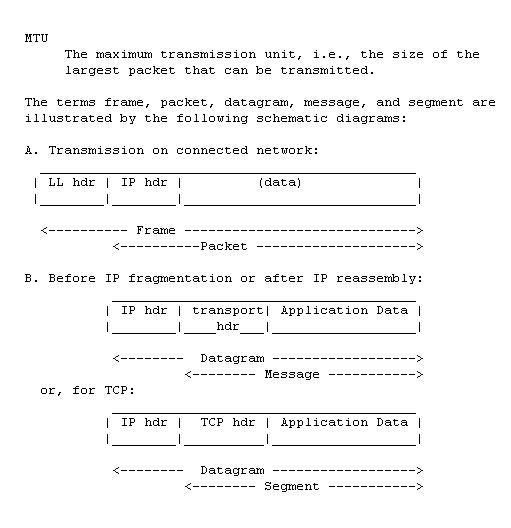
Below are the outputs from multiple systems:
Windows - XP
X:\>ping 192.168.1.1 -l 1500 -f
Pinging 192.168.1.1 with 1500 bytes of data:
Packet needs to be fragmented but DF set.
Packet needs to be fragmented but DF set.
Packet needs to be fragmented but DF set.
Packet needs to be fragmented but DF set.
Ping statistics for 192.168.1.1:
Packets: Sent = 4, Received = 0, Lost = 4 (100% loss),
X:\>ping 192.168.1.1 -l 1473 -f
Pinging 192.168.1.1 with 1473 bytes of data:
Packet needs to be fragmented but DF set.
Packet needs to be fragmented but DF set.
Packet needs to be fragmented but DF set.
Packet needs to be fragmented but DF set.
Ping statistics for 192.168.1.1:
Packets: Sent = 4, Received = 0, Lost = 4 (100% loss),
X:\>ping 192.168.1.1 -l 1472 -f
Pinging 192.168.1.1 with 1472 bytes of data:
Reply from 192.168.1.1: bytes=1472 time=25ms TTL=255
Reply from 192.168.1.1: bytes=1472 time=4ms TTL=255
Reply from 192.168.1.1: bytes=1472 time=4ms TTL=255
Reply from 192.168.1.1: bytes=1472 time=3ms TTL=255
Ping statistics for 192.168.1.1:
Packets: Sent = 4, Received = 4, Lost = 0 (0% loss),
Approximate round trip times in milli-seconds:
Minimum = 3ms, Maximum = 25ms, Average = 9ms
Linux
Server1:~# ping -s 1472 -M do 192.168.1.1
PING 192.168.1.1 (192.168.1.1) 1472(1500) bytes of data.
1480 bytes from 192.168.1.1: icmp_seq=1 ttl=255 time=2.88 ms
Server1:~# ping -s 1473 -M do 192.168.1.1
PING 192.168.1.1 (192.168.1.1) 1473(1501) bytes of data.
From 192.168.1.218 icmp_seq=1 Frag needed and DF set (mtu = 1500)
JUNOS
root@M10i1# run ping 10.10.1.2 size 1500 do-not-fragment rapid
PING 10.10.1.2 (10.10.1.2): 1500 data bytes
ping: sendto: Message too long
.ping: sendto: Message too long
.ping: sendto: Message too long
.ping: sendto: Message too long
.ping: sendto: Message too long
.
--- 10.10.1.2 ping statistics ---
5 packets transmitted, 0 packets received, 100% packet loss
[edit routing-options]
root@M10i1# run ping 10.10.1.2 size 1472 do-not-fragment rapid
PING 10.10.1.2 (10.10.1.2): 1472 data bytes
!!!!!
--- 10.10.1.2 ping statistics ---
5 packets transmitted, 5 packets received, 0% packet loss
round-trip min/avg/max/stddev = 0.861/0.908/1.065/0.079 ms
[edit routing-options]
root@M10i1# run ping 10.10.1.2 size 1473 do-not-fragment rapid
PING 10.10.1.2 (10.10.1.2): 1473 data bytes
ping: sendto: Message too long
.ping: sendto: Message too long
.ping: sendto: Message too long
.ping: sendto: Message too long
.ping: sendto: Message too long
.
--- 10.10.1.2 ping statistics ---
5 packets transmitted, 0 packets received, 100% packet loss
Cisco IOS
Router#ping 10.10.1.1 size 1500 df-bit
Type escape sequence to abort.
Sending 5, 1500-byte ICMP Echos to 10.10.1.1, timeout is 2 seconds:
Packet sent with the DF bit set
!!!!!
Success rate is 100 percent (5/5), round-trip min/avg/max = 1/1/4 ms
Router#ping 10.10.1.1 size 1501 df-bit
Type escape sequence to abort.
Sending 5, 1501-byte ICMP Echos to 10.10.1.1, timeout is 2 seconds:
Packet sent with the DF bit set
.....
Success rate is 0 percent (0/5)
Cisco IOS XR
RP/0/RP0/CPU0:P2#ping 20.20.20.1 size 1500 donnotfrag
Sun Feb 7 07:13:57.440 UTC
Type escape sequence to abort.
Sending 5, 1500-byte ICMP Echos to 20.20.20.1, timeout is 2 seconds:
!!!!!
Success rate is 100 percent (5/5), round-trip min/avg/max = 1/1/1 ms
RP/0/RP0/CPU0:P2#ping 20.20.20.1 size 1501 donnotfrag
Sun Feb 7 07:14:09.290 UTC
Type escape sequence to abort.
Sending 5, 1501-byte ICMP Echos to 20.20.20.1, timeout is 2 seconds:
M.M.M
Success rate is 0 percent (0/5)
I believe that the next step is to cover the differences in MTU behavior and settings on IOS, IOS XR and JUNOS, I think it is going to be very interesting due to the difference in behavior and the lack of in depth coverage for such thing, however it is very simple.
Cisco IOS excludes the Layer 2 header from the interface MTU, while IOS XR as well as JunOS includes the Layer 2 header in the interface MTU. For example the default MTU for Ethernet interface is: IOS:1500byte / IOS XR:1514bytes / JunOS:1514bytes.
NOTE I do like Cisco IOS way since it is the more appealing way, when I am talking about the layer 2 frame payload I should be excluding the layer 2 header.
You must take care when changing the default MTU setting, the whole point is to always remember whether the header is included or not - The second thing, Cisco accommodates the extra 4 bytes of dot1q (Cisco IOS doesn't include the header anyway, while IOS XR accommodates the extra 3 bytes for the dot1q subinterfaces) however JunOS doesn't, and thus with JunOS you need to do this your self and thus configuring the MTU to 1618 to explicitly accommodate the extra 4 bytes.
Cisco IOS
router#sh interfaces g0/1 | i MTU
MTU 1500 bytes, BW 100000 Kbit, DLY 100 usec,
router#sh ip interface g0/1.1 | i MTU
MTU is 1500 bytes
After Changing the MTU to 1600:
router#sh interfaces g0/1 | i MTU
MTU 1600 bytes, BW 1000000 Kbit, DLY 10 usec,
router#sh ip interface g0/1 | i MTU
MTU is 1600 bytes
Cisco IOS XR
RP/0/RP0/CPU0:router#sh int Gi0/1/0/9 | i MTU
Wed Oct 6 20:43:44.192 CLT
MTU 1514 bytes, BW 1000000 Kbit
RP/0/RP0/CPU0:router#sh ip int g0/1/0/9 | i MTU
Wed Oct 6 20:43:47.306 CLT
MTU is 1514 (1500 is available to IP)
After Changing the MTU to 1614:
RP/0/RP0/CPU0:router#sh int g0/1/0/1 | i MTU
Wed Oct 6 21:10:00.446 CLT
MTU 1614 bytes, BW 1000000 Kbit
RP/0/RP0/CPU0:router#sh ip int g0/1/0/1 | i MTU
Wed Oct 6 21:10:08.414 CLT
MTU is 1614 (1600 is available to IP)
After Changing the MTU to 1614 with dot1q:
RP/0/RP0/CPU0:router#sh int g0/1/0/9 | i MTU
Wed Oct 6 21:35:04.088 CLT
MTU 1614 bytes, BW 1000000 Kbit
RP/0/RP0/CPU0:router#sh ip int g0/1/0/9 | i MTU
Wed Oct 6 21:35:07.274 CLT
MTU is 1614 (1600 is available to IP)
RP/0/RP0/CPU0:router#sh ip int g0/1/0/9.1 | i MTU
Wed Oct 6 21:35:11.972 CLT
MTU is 1618 (1600 is available to IP)
JunOS
root@router# run show interfaces ge-0/0/1 | match MTU
Link-level type: Ethernet, MTU: 1514, Speed: 1000mbps, BPDU Error: None, MAC-REWRITE Error: None, Loopback: Disabled,
Protocol inet, MTU: 1500
Protocol iso, MTU: 1497
Protocol mpls, MTU: 1488
Protocol multiservice, MTU: Unlimited
NOTE This test was conducted by a Juniper M10i, as show it reduces the maximum 3 labels (12 bytes) to calculate the maximum MPLS packet payload, which is illogical (unless they faced an implementation issue), I've tested this on an M10i (with IP2), however I haven't tested this on a router with an I-Chip or Trio-Chipset or a T-series router (not having the 3 labels issue).
After Changing the MTU to 1614:
root@router# run show interfaces ge-0/0/1 | match MTU
Link-level type: Ethernet, MTU: 1614, Speed: 1000mbps, BPDU Error: None, MAC-REWRITE Error: None, Loopback: Disabled,
Protocol inet, MTU: 1600
Protocol iso, MTU: 1597
Protocol mpls, MTU: 1588
Protocol multiservice, MTU: Unlimited
After Changing the MTU to 1618 (with dot1q configured):
root@router# run show interfaces ge-0/0/2 | match MTU
Link-level type: Ethernet, MTU: 1618, Speed: 1000mbps, BPDU Error: None, MAC-REWRITE Error: None, Loopback: Disabled,
Protocol inet, MTU: 1600
Protocol iso, MTU: 1597
Protocol mpls, MTU: 1588
Protocol multiservice, MTU: Unlimited
I hope that I was informative, have a nice day.
BR,
Mohammed Mahmoud.
RFC1122 - Requirements for Internet Hosts - Communication Layers
Check Also


